 Super Intelligent Sender
Your cold emails are going to spam
Usually the cause is how you send, not only what you write. Super Intelligent Sender controls the how; your domain setup and copy do the rest.
Why are my cold emails going to spam?
Mailbox providers look at your domain's authentication (SPF, DKIM and DMARC), how many emails a mailbox sends and how fast, how many bounce, whether recipients can unsubscribe easily, and how people react to your emails. Sending in bursts, mailing old lists with many bad addresses and leaving out a working unsubscribe all hurt. Super Intelligent Sender limits and paces sending per mailbox, suppresses bounces and opt-outs, and adds one-click unsubscribe headers to every email. It cannot set up your domain or guarantee the inbox.
Signs you have this problem
- Opens fall sharply while you are sending the same volume
- Replies stop arriving even from leads who used to answer
- Test emails to your own Gmail land in the Spam folder
- A lot of your emails bounce back as undeliverable
What Super Intelligent Sender does about it
Daily and hourly limits
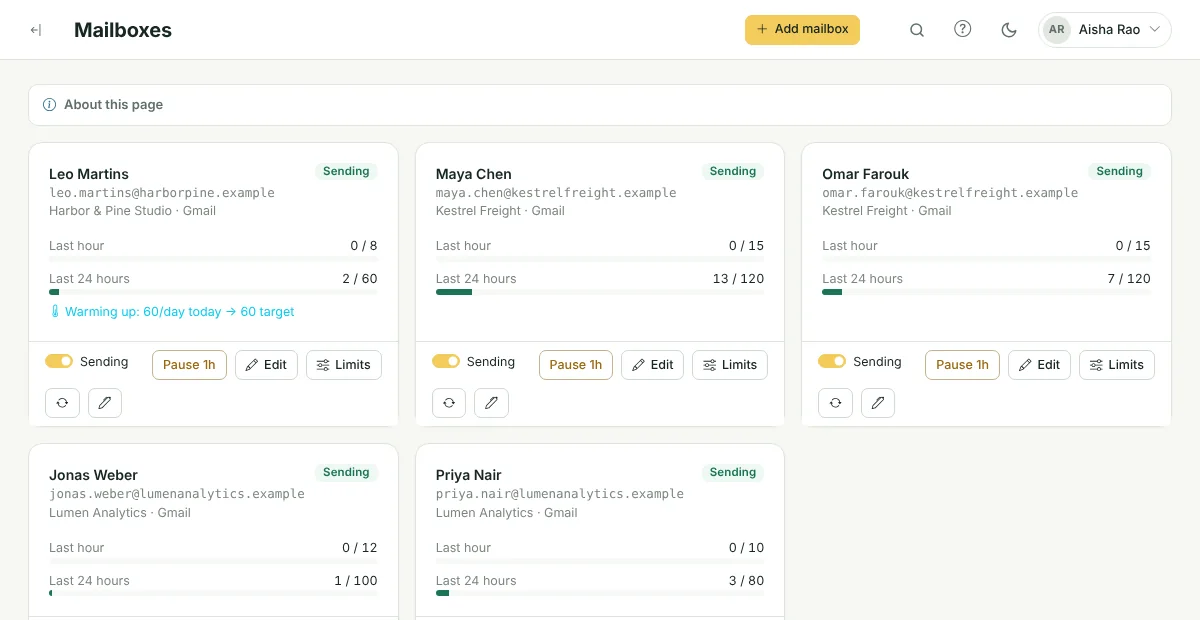
Each mailbox has rolling limits, and sends are spread through the hour instead of going out in bursts.
Gradual ramp-up
A new mailbox can start low and add a set number of emails per day until it reaches its target.
Bounces suppressed
Hard-bounced addresses are suppressed so they are not tried again.
One-click unsubscribe
Every email has an unsubscribe link and List-Unsubscribe headers that mail apps can show as a button.
Shared inboxes skipped
Role addresses such as info@ and sales@ are skipped at import.
Your own tracking domain
Tracked links can use a verified domain you own instead of a shared one.
What Super Intelligent Sender does not do
Super Intelligent Sender does not set up SPF, DKIM or DMARC for your domain, does not run a warm-up network, and cannot promise that any email reaches the inbox. Check your domain's authentication with your DNS provider or Google Workspace admin first.
Frequently asked questions
Why are my cold emails going to spam?
Mailbox providers look at your domain's authentication (SPF, DKIM and DMARC), how many emails a mailbox sends and how fast, how many bounce, whether recipients can unsubscribe easily, and how people react to your emails. Sending in bursts, mailing old lists with many bad addresses and leaving out a working unsubscribe all hurt. Super Intelligent Sender limits and paces sending per mailbox, suppresses bounces and opt-outs, and adds one-click unsubscribe headers to every email. It cannot set up your domain or guarantee the inbox.
Can any tool guarantee my emails reach the inbox?
No. Inbox placement is decided by each mailbox provider. A tool can control how you send; your domain setup, list quality and content still matter.
Should I use a separate domain for cold email?
Many teams send cold email from a separate domain or subdomain so that problems do not affect their main company mail. Set up SPF, DKIM and DMARC on it before sending.
Related features
Sending & limits
Connect your Gmail or Google Workspace mailboxes and Super Intelligent Sender decides, for each message, whether now is the right time to send it.
Learn more →Unsubscribes & do-not-contact
Opt-outs, bounces and your own block list are checked before every email, in every campaign.
Learn more →Open & click tracking
Opens and clicks land on the lead's timeline. Links run through your own verified domain.
Learn more →See Super Intelligent Sender with your own sending setup
Book a short demo. We will connect a mailbox, check your timing and walk through replies and the pipeline with you.
- 20-minute call
- On your own mailboxes
- Reply within one business day