 Super Intelligent Sender
Your follow-ups go out after people have already answered
Nothing looks worse than "just bumping this" to someone who said yes yesterday.
How do I stop follow-ups after a lead replies?
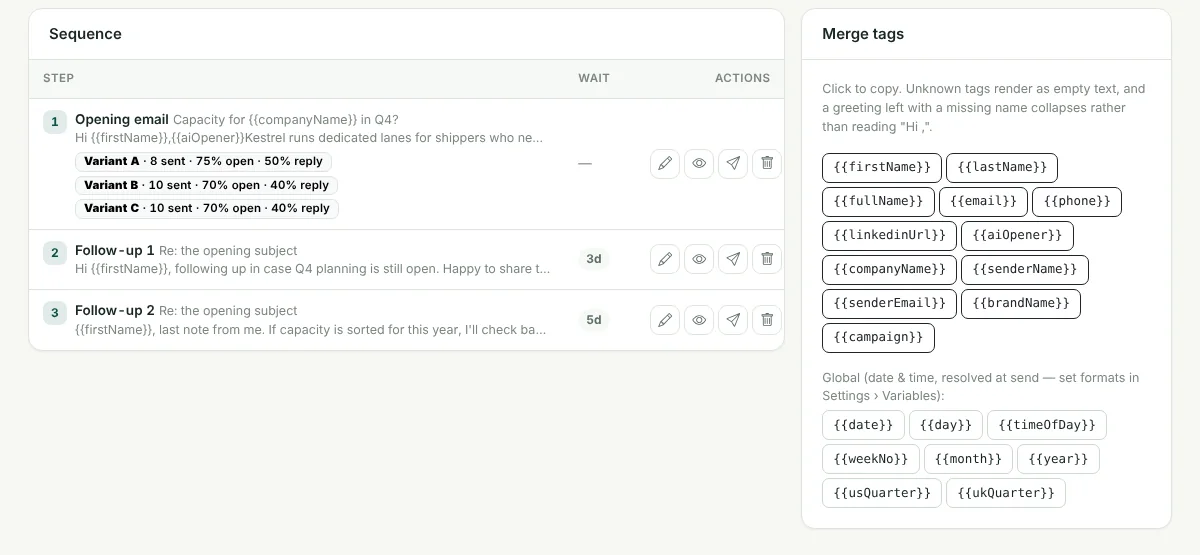
In Super Intelligent Sender, a positive or negative reply or a bounce cancels that lead's remaining emails in the campaign. An out-of-office pauses the sequence and picks it up after the return date in the auto-reply. Moving a lead out of the sequence on the pipeline cancels its queued emails too. Follow-ups that do go out are sent from the mailbox that sent the opener, with a "Re:" subject and the threading headers mail apps use, so they appear in the same conversation.
Signs you have this problem
- A lead replies "please stop" after your third follow-up
- Follow-ups arrive as brand-new emails instead of in the thread
- A follow-up comes from a different mailbox than the opener
- Out-of-office auto-replies trigger the next step anyway
What Super Intelligent Sender does about it
Replies stop the sequence
Positive and negative replies and bounces cancel the lead's remaining emails.
Out-of-office handled
Super Intelligent Sender reads the return date from the auto-reply, pauses the sequence and resumes it after that date.
Same thread
Follow-ups reuse the opener's subject with one "Re:" and the original message's threading headers.
Same mailbox
Every follow-up goes from the mailbox that sent the opener.
Manual moves count
Moving a lead on the pipeline cancels its queued emails.
Waits between steps
Each follow-up waits its set number of days, then for the lead's business hours.
What Super Intelligent Sender does not do
If someone replies from a different address, or forwards your email to a colleague who answers, Super Intelligent Sender may not match that reply to the lead.
Frequently asked questions
How do I stop follow-ups after a lead replies?
In Super Intelligent Sender, a positive or negative reply or a bounce cancels that lead's remaining emails in the campaign. An out-of-office pauses the sequence and picks it up after the return date in the auto-reply. Moving a lead out of the sequence on the pipeline cancels its queued emails too. Follow-ups that do go out are sent from the mailbox that sent the opener, with a "Re:" subject and the threading headers mail apps use, so they appear in the same conversation.
Does an out-of-office stop the sequence for good?
No. Super Intelligent Sender reads the return date from the auto-reply when it can, and resumes the sequence after that date. If it cannot find a date, it waits a set number of days.
What happens after a "not right now" reply?
A neutral reply pauses the sequence for a set number of days, then it continues.
Related features
AI reply inbox
Replies arrive in one inbox, already labelled. Answer the interested ones without leaving Super Intelligent Sender.
Learn more →Lead pipeline
A pipeline board for the leads your emails warm up, with the full history one click away.
Learn more →Sequences & A/B tests
Write the opener and follow-ups once. Super Intelligent Sender personalises each one and keeps follow-ups on the same thread.
Learn more →See Super Intelligent Sender with your own sending setup
Book a short demo. We will connect a mailbox, check your timing and walk through replies and the pipeline with you.
- 20-minute call
- On your own mailboxes
- Reply within one business day